⭐Arduino Master class - Lesson 1: Why and How to Begin
Arduino is one of the simplest ways to enter the world of electronics and programming. Whether you're a beginner or want to create robots, automation systems, smart devices, or simply understand how technology works, Arduino is always an excellent starting point.
🤔Why Arduino?
Arduino helps anyone turn ideas into real products. You don't need to be an electronics expert to create your first prototype. With just a small board and a few lines of code, you can experiment, learn, and see results immediately.
Arduino is also a great way to understand how hardware and software work together. The process of trying, failing, and adjusting continuously helps you learn faster and more naturally than just learning theory.
Additionally, Arduino opens up the world of sensors and actuators. You can create weather forecasting stations, smart home systems, interactive art installations, or anything you imagine.
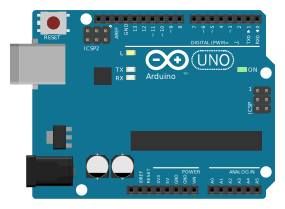
Image by PhilippHenkel (Wikimedia Commons)
🤖Why Learn Arduino in an Era of Robots and AI Everywhere?
AI can think, but to interact with the real world, it still needs hardware.
Robots, IoT systems, drones, smart home sensors – all depend on electronics, microcontrollers, motors, signals, and sensors.
Learning Arduino helps you understand the logic behind these technologies:
- •How do motors work?
- •How do sensors measure distance?
- •How do circuits respond?
- •How do devices interact with their environment?
In an era full of automation, knowing Arduino helps you create technology instead of just using it. You can build smart devices, improve daily life, or even create your own robots.
🔧The Arduino Spirit: Tinkering - What You Build Is Treasure
Arduino is not just a board...
It's also a way of learning through doing, trying, and exploring instead of following rigid processes.
Old toys or cheap items are excellent sources of components to dissect, learn from, and reuse. With countless cheap tech toys out there, you can create interesting ideas with just a few small items like noisy cats, light swords…
They allow you to experiment quickly, cheaply, and extremely fun.

Technology is not scary at all. One of my favorite resources is the booklet "Low Tech Sensors and Actuators" by Usman Haque and Adam Somlai-Fischer – it perfectly describes how to use cheap materials to learn about sensors, mechanisms, and interaction.
This spirit is at the core of learning Arduino:
- ✓Don't be afraid of breaking things.
- ✓The more you try, the better you get.
- ✓The more you play, the more you understand.
Welcome to Arduino
“Traditional engineering relies on a strict process to go from A to B; the fun with Arduino is... getting lost along the way and accidentally discovering point C.”
⭐Why Arduino Matters
Perfect for Beginners
You don't need to build everything from scratch. Arduino makes electronics accessible to everyone.
Fast Prototyping
Confirm your ideas work quickly so you can motivate yourself (or investors!) to take the next step.
Global Community
Millions of makers worldwide share projects, help each other, and pour knowledge onto the web.
Affordable & Accessible
Start with low-cost boards and reuse existing technology to build amazing projects.
🔧Arduino Has Both Software and Hardware
Hardware lets you interact with the real world, while software determines how the system behaves.
💻 Software
Arduino or any IDE is where you write code (sketches) to control your board.
- •Write code in Arduino language (based on C/C++)
- •Compile code into machine language
- •Upload to board via USB
🔌 Hardware
Arduino board is the brain that controls electronic components.
- •Microcontroller (like ATmega328P on Uno)
- •GPIO pins to connect sensors, LEDs, motors
- •USB port for programming and power
🎯Start With Simulation
Important Tip: Use Simulation Before Real Wiring
When learning Arduino, don't just wire things up in real life. Use circuit simulators (TinkerCAD, Fritzing, Wokwi...). Simulation is like a safe playground where you can tinker, experiment, and fix errors without burning anything. Learning this way is both faster and saves money on components.
🔄Arduino Workflow: 4 Simple Steps
1. Connect
Plug Arduino into your computer via USB
2. Write Code
Write a sketch in the Arduino IDE
3. Upload
Upload the sketch through USB
4. Watch Magic
Your project comes to life!
🌍Learning Resources & Community
Collaboration is key in the Arduino world. People from around the globe share knowledge and help each other learn:
Arduino Forum
Get help from experienced Arduino users worldwide
Project Hub
Browse thousands of documented Arduino projects
YouTube
Watch video tutorials and project walkthroughs with keywords: Arduino projects
Instructables
Step-by-step project guides with photos
Tinkercad
Simulate Arduino circuits in your browser - no hardware needed!
Hackster.io
Discover projects and connect with makers
Ready to Start Building?
Learn the dev.ga course "Arduino Masterclass" to dive deeper into Arduino programming and electronics.